Friday, September 28, 2012

Software Releases • Lingerie Girls Wallpapers! Vol.235

Lingerie Girls Wallpapers! Vol.235
Requirements: --
Overview: A pack of 50 high quality (resized from HD) wallpapers with very HOT girls for your android! For men only.

Image

Dimension of images: 960x800 (especially for Galaxy S)

More Info:

Software Releases • Titanium Backup Pro 5.6.0

Titanium Backup Pro 5.6.0
Requirements: ANDROID 1.0 and up
Overview: EXTREMELY powerful tool. Backup ALL apps, Market links, remove bloatware & MORE!
Image

Image Image

☆Needs ROOT, Android 1.5-4.1+ (ARM,x86,MIPS)
☆Over 5.5 million users, 28+ languages.
☆PRO Key is available on Play Store!
☆Voted #1 TOP ROOT APP on Twitter.
☆Problem? See titaniumtrack.com/kb
☆Scroll down for more info & VIDEOS ;-)
☆ ☆ ☆

Titanium Backup is the most powerful backup tool on Android, and then some.

You can backup, restore, freeze (with Pro) your apps + data + Market links. This includes all protected apps & system apps, plus external data on your SD card. You can do 0-click batch & scheduled backups. Backups will operate without closing any apps (with Pro). You can move any app (or app data) to/from the SD card. You can browse any app's data and even query the Market to see detailed information about the app.

Also see the paid PRO key which adds EVEN MORE awesome features such as:
[✔] 0-click batch restores
[✔] Keep multiple backups per app
[✔] Multi-user app data
[✔] Apps freezer
[✔] Sync to/from Dropbox (manual/scheduled)
[✔] Sync to/from Box (manual/scheduled)
[✔] Sync to/from Google Drive (manual/scheduled)
[✔] Convert user apps <=> system apps
[✔] Integrate system app updates into ROM
[✔] Encryption
[✔] Market Doctor (relink apps to Market)
[✔] "Destroy all Market links" feature
[✔] Hypershell speed
[✔] Backup apps without closing them!
[✔] Restore individual apps+data from CWM backups!
[✔] Restore individual apps+data from TWRP backups!
[✔] Market "auto updating" manager
[✔] Dalvik cache cleaner
[✔] Integrate Dalvik cache system elements into ROM
[✔] Unlimited schedules
[✔] Load/Save a Filter and use it in Widgets/Schedules
[✔] Protect backup against deletion
[✔] Send backup (to e-mail/cloud) and import it in 1 click
[✔] Backup→Verify→Un-install an app in one shot
[✔] Freeze/defrost/launch apps in a single click
[✔] CSV export any app DB (e-mail or Google Docs)
[✔] Convert app data to/from fast WAL format
[✔] WAY MORE!

What's in this version:
• Added "Clear cache" action to the special features screen.
• Added support for "wallpaper", "accounts", "app widgets" items on Jelly Bean.
• Fixed failure when backing up SMS/MMS to XML on LG P970 (ROM bug).
• Fixed some batch actions that included unnecessary elements. For example "Clear cache" included Wallpaper, which had no effect but was confusing.
• Fixed glitch where progress notifications jumped up & down during batch jobs if another app also had ongoing notifs.
• Updated translations.

Note:
1. Please remove all previous versions of Titanium Backup.
2. Remove com.keramidas.TitaniumBackup.odex in data/app if you used lucky patcher to patch Titanium Backup.
3. Install and run!

This app has NO advertisements

More Info:

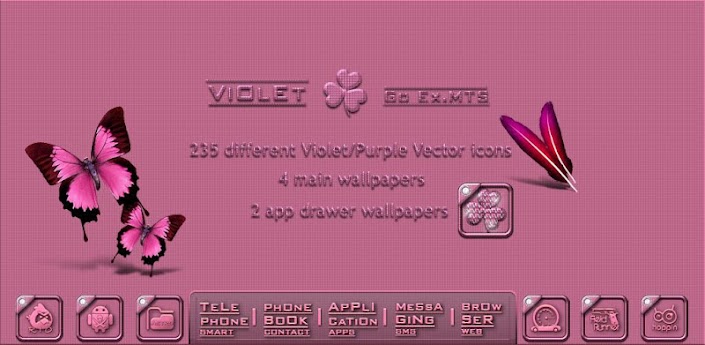
Violet Go Launcher EX theme v1.1

Violet Go Launcher EX theme v1.1
Requirements: 2.0 and up
Overview: It's Violer/Purple Go launcher theme


[break]

- 235 Violet(Purple)Vector icons

- 4 main wallpapers

- 2 app drawer wallpapers

- clock widjet (is not include theme)

How to use...

1. Search "Go launcher EX" and download and install

2. Install this theme

3. Run Go Laucher EX

4. Menu> preferences> theme preferences> choose

a this theme

This app has no advertisements

More Info:


Code:

https://play.google.com/store/apps/details?id=com.multi.go.launcherex.theme.violet


Download Instructions:
http://ul.to/gzx1riou

mirror:
http://rapidgator.net/file/46414038/...e_1.1.apk.html
http://www.filedownloads.org/uemqw62...e_1.1.apk.html

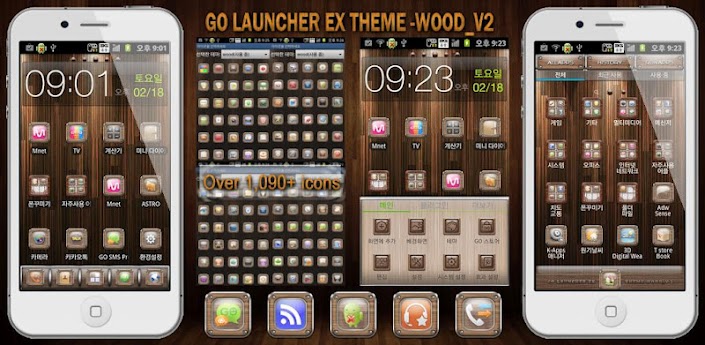
GO_Launcher_Theme – Wood v1.1

GO_Launcher_Theme - Wood v1.1
Requirements: 2.0+
Overview: GO_Launcher_Theme - Wood

- Caution

If you users of previous versions.

First, please back up the previous version.

Because, the default icon has been changed.


[break]

This supply the most icons(More than 1,090) and App activities(More than 1,760) in existence. When you apply theme, There are many icons automatically changed, So it reduces user's burden of changing icons.

Please contact us by e-mail, If you want any other icon and improvement. We support additional services such as updating etc.(sojunsoju@gmail.com)

1. Features of theme.

1) More than 1,090 of pre-fabricated theme-only icons.

2) Connected with more than 1,760 of App activities.

3) More than 1,050 of automatically change icons.

4) 10 kinds of wallpaper.

5) 3 kinds of dock image.

6) 6 kinds of App drawer wallpaper.

2. Reference (Icons and Activities in GO_Launcher_EX theme)

- Are there many Icons connected with application activities in this theme?

Yes, when users apply theme, there are many icons automatically changed, so it reduces user's burden of changing icons themselves.

- Why are there so many Icons in GO_Launcher_EX theme?

Because it supplies various icons to users who want to change it.

- If there are many icons on this theme, Doesn't it overload the system?

No. After installed, theme just recognize registered icons, So it doesn't overload the system.

3. Install GO_Launcher_EX as default screen.

1) First, install the latest version of GO_Launcher_EX. It is totally free.

2) To set GO_Launcher_EX as default screen.

a) After GO_Launcher_EX installed, click the Home button, and default launcher pop-up comes on.

b) Check the "Use by default for this action" > Select the GO_Launcher_EX, and GO_Launcher_EX will be set as default launcher.

4. How to use GO_Launcher_EX

1) Features of theme : If you apply this theme, then wallpapers, icons, dock images, app drawer wallpapers, etc. will be applied.

2) To apply theme : Install the GO_Launcher_EX, Click GO_Launcher_EX home screen > Menu > themes > Select this theme.

3) Changing wallpaper : GO_Launcher_EX home screen > Menu > wallpaper > Go wallpaper > Select this theme's wallpaper.

4) Changing dock image : GO_Launcher_EX home screen > Menu > Preferences > Visual settings > Backgrounds > Dock background > GO Theme background > Select this theme's dock image.

5) Changing App drawer wallpaper : GO_Launcher_EX home screen > Menu > Preferences > Visual settings > Backgrounds > App drawer background > GO Theme background > Select this theme's app drawer wallpaper.

6) Effects setting : GO_Launcher_EX home screen > Menu > Preferences > Effects > Select the effects you want.

7) Action settings : GO_Launcher_EX home screen > Menu > Preferences > Operation Settings > Select the action you want.

This app has no advertisements

More Info:


Code:

https://play.google.com/store/apps/details?id=com.sojunsoju.go.launcherex.theme.wood


Download Instructions:
http://ul.to/vbbdpwsc

mirror:
http://rapidgator.net/file/46424280/...d_1.1.apk.html
http://www.filedownloads.org/ohffta7...d_1.1.apk.html

Universe HD Wallpapers v1.0

Universe HD Wallpapers v1.0
Requirements: Android 1.6+
Overview: View Universe HD Wallpapers

Feature:

- View Universe HD Wallpapers

- Not require registration and login

- Offline collection

- No Ads

This app has NO advertisements

More Info:


Code:

www.mixrelease.com


Download Instructions:
http://ul.to/02ebd40s

Thursday, September 27, 2012

Software Releases • System Tuner Pro v2.5.2

System Tuner Pro v2.5.2
Requirements: 1.6+
Overview:
The most complete Android system suite: monitor and record all activities, backup and restore *any* applications, extended task killer, CPU SD and memory controls, logcat reader, terminal emulator, widgets and notifications, all in one highly optimized app!

Image


WARNING: Requires WIFI, BT, PHONE and GPS permissions to record phone states. App checked with Privacy Inspector!

By far the lowest consumption monitoring app! Check web-site for app consumption!

You can add shortcuts to your home screen for any of the below features/screens!

Task Manager: (can be set as main UI, see options)

Filter user/system/kernel processes and exclusion list
Shows cpu load/frequency, memory/internal/sd usage
Sort processes by cpu times, start time, memory or by name
Kill non manually excluded apps automatically
Shows detailed information about running apps and processes
Open app system settings
Read app logcat
Manually kill running apps

CPU Manager (rooted phones):

Tweak CPU governor + frequencies during screen-off, on-call
Tweak CPU voltage (when available on custom Kernel)
Set CPU settings on boot
Uses OC/deamon when available and can disable it

Extended Task Killer

Kill non-excluded apps automatically or manually
Kill apps during screen-on, screen-off or when widget refreshes
Manually exclude or include apps
All system apps are excluded by default
Manually kill kernel processes (root)
Display memory and SD details (RAM & internal)

Application Manager without root:

Backup/restore/uninstall user apps, only APKs are backed-up
Launch and read app logcat

Application Manager with root:

Freeze/unfreeze apps
Remove app from boot
Backup/restore/uninstall any apps and settings, including system apps
Launch and read app logcat
Display application data and cache usage
Sort application by name, data usage or cache usage
Move any apps to/from system/user/SD space
Clear caches or dalvik cache (must reboot after)

Activity Recorder:

Record (optionally at boot) activities in the background
Record all apps or all processes
Record phone states (screen, wifi, bluetooth, gps, mobile data, signal)
Import Battery Monitor Widget Pro data for detailed analysis!
Allows analyzing past recordings without limits

Logcat Reader:

Display log(cat) for all/one process
Filter logcat by message levels
Filter logcat based on user-defined text
Save logcat to file
Clear existing logcat (root)

Terminal Emulator:

Keeps history of previously used Linux commands
Save output to file
Run pre-existing scripts
Run commands as Super User (root)

System Tweaker (root):

Tweak SD cache size to boost performance
Tweak IO scheduler to boost performance
App booster on boot (APK alignement + DB cleanup)
Tweak Android auto-kill memory settings
Uses Linux init.d script when available

Notifications:

Show cpu load, frequency, governor, free/used memory (flash/internal/sd)
Show most information (cpu, memory, internal, SD)
Optionally shows a configurable graphic time-line
Provided as external packages, many available for white/black notification backgrounds

Widget:

Many different widget backgrounds: HTC Sense 2 or 3, Google, Glassy half, ICS or fully transparent.
Show cpu load, frequency, governor, free/used memory (flash/internal/sd), process count using text or 2 side levels.
Starts 2 different actions by clicking on the icon or label, including:
Start/stop recording process activity
Kill all non-excluded processes
Refresh
Start any app activities
Open settings

What's in this version : (Updated : Sep 27, 2012)

New kill button in task-manager
Bug fixes


Software Releases • No Root Screenshot It v3.38

No Root Screenshot It v3.38
Requirements: 1.5+
Overview: FINALLY, A SCREENSHOT APP THAT DOESN'T REQUIRE ROOT
"No Root Screenshot It" is an application that lets you take screenshots of your phone. This application works on ALL phones. Root is NOT required.

Image

This application is for those users who need to take screenshots, but don't have root access to their phones.

PLEASE READ CAREFULLY BEFORE INSTALLING:

This application will instruct you to download and install a free desktop application on your Windows or Mac. Once installed, you must run the desktop application with your phone attached to your computer. This will enable screenshots on your phone.

Once you've done this, you can disconnect your phone and take screenshots whenever you want. However, every time you restart your phone, you'll have to connect it to your computer and run the desktop application again. If you restart your phone frequently, this app may not be for you, as it may prove to be too inconvenient.

Your phone will NOT be rooted or temp-rooted in any way. No system files on your phone will be altered.

If your phone is already rooted, please download the normal "Screenshot It" application from the Android market.

Features:

Take a screenshot of your phone's screen
Save as a jpg or png file and share anywhere
Crop screenshots
Annotate and draw on screenshots
Screen shot status bar button
Screenshot widget button
Shake to screen shot
Delayed screenshot timer
"Share" menu integration
Custom save directory
Overlay phone information on screenshots
Works on ALL devices

What's in this version : (Updated : Sep 64, 2012)

Fixed the issue in the previous update where some phones were not able to take screenshots, even after running the enbaler

THIS APP HAS NOT ADVERTISMENTS

Software Releases • Android Voice Xtreme v2.40

Android Voice Xtreme v2.40
Requirements: 2.2+
Overview: Who should use AVX? If you are looking for an application that provides hands-free operation of your phone to open apps, read and reply to text messages and email, schedule calendar events and many more functions that you can perform using just your voice then AVX is right for you.

Image

More Info:

If you are just looking for an electronic friend to chat with then please go with one of the Siri clones. On the other hand if you want a real virtual assistant that has useful functions that will make your life easier then please give AVX a try.

AVX has all the functions you'd expect your assistant to perform plus some that you probably never new were possible. Here is a list of some of the functions that you wont find in most of the competition:

Features:

Reading and replying to incoming text and email including Exchange
Integration with Evernote
Home Automation with INSTEON. Turn on the lights and appliances, open the garage door and a whole lot more, all with voice commands or scheduled or based on your location.
Location based reminders. Remind you to do something based on your location.
Location based actions. Perform any function that AVX can do based on your current location. Have AVX automatically text your wife when you leave the office.
Time based actions. Perform any function that AVX can do on a set day and time
In car mode including wake up phrase
Custom voice shortcuts to your phone applications. Give your apps any name you want and open them using that name.
Voice bookmarks to your favorite web sites. Give your bookmarks any name you want and open them using that name.
Activate just by shaking your phone
Works with all Bluetooth Headsets

For the full online manual please go to: www.bulletproof.com/avx


What's in this version : (Updated : Sep 20, 2012)

PET NAMES, TIME FORMATS
NFC TAGS (VIDEO)
ANDROID 4.1
NOW READS YOUR TWITTER FEED (VIDEO)
SELECT CONTACT DEFAULT EMAIL AND NUMBERS
BLUETOOTH IMPROVEMENTS
NEW MESSAGING FEATURES (VIDEO)
INTEGRATION WITH TASKER (VIDEO)
QUICK START HELP MENU
HANDS-FREE READ AND REPLY TO FACEBOOK FEED (VIDEO)
SPEAK AND PROMPT MESSAGE MODE
NEW SETTINGS PROFILES
EVERNOTE INTEGRATION
EXCHANGE INTEGRATION
LOCATION BASED ACTIONS, REMINDERS


App Backup &amp; Restore v2.0.4 Android

App Backup & Restore v2.0.4
Requirements: Android 1.6+
Overview: Backup & restore apps for android device

App Backup & Restore is used to backup and restore apps for android.

Features:

- Backup apps to SD card

- Batch backup

- Backup market link for protected apps

- Restore apps from SD card

- Batch restore

- Quick uninstalling

- Sort apps by name, install date, size

- Auto backup on install

- Show storage usage

- Multi version backup

- Search app from Google market

- Send apk file by email

- Share market link

- Support App2SD

*** Notice: App Backup cannot backup data or settings of apps for you, but it only backup the apk files.

FAQ:

-----

Q: Why can't I restore apps?

A: Go to "System Settings"->"Applications", enable the "Unknown sources" setting, then you can restore apps from SD card.

Q: Does it backup data of apps?

A: No, currently it only backup the apk files of apps.

Q: How can I send the archived app to drop box?

A: It requires the dropbox already installed in your phone, click "Archived" Tab, long click on the app that you want to send, then click "Dorpbox".

Q: What are "Protected" apps?

A: "Protected" means that the apps are protected by "Copy Protection", and the apk file of them cannot be copied to SD card. On backup, the market links of them will be saved for restoring.

Q: How to check all un-archived or un-installed apps?

A: Click on the checkbox in the left bottom.

***Any question, please send feedback to us by clicking "menu"->"feedback" in the app***

***************************

INFOLIFE, Make Life Easier!

***************************

To help us translate thiss app to your native language, please sign up in http://crowdin.net/project/app-backup-restore

thank you very much

What's new in this version:

-v2.0.4

#Fix DROID RAZR failed to backup bug

-v2.0.3

#Save sort state

#Send debug info after failure

#Hide search bar in settings

-v2.0.2

#Check all un-installed apps

#Check all un-archived apps

#Clear cache & refresh in settings

(Click the check all button in the left bottom to check all un-archived apps)

-v2.0.1

#Fix FC bug

(We are very sorry about the FC bug!)

-v2.0.0

#New UI

#Removable storage check

#Fix some bugs

-Recommend app nag screen removed by Unexampled Orion

This app has NO advertisements

More Info:


Code:

https://play.google.com/store/apps/details?id=mobi.infolife.appbackup


Download Instructions:
http://www66.zippyshare.com/v/77101492/file.html