Saturday, August 25, 2012

Software Releases • Liveview Manager v1.0.1

Liveview Manager v1.0.1
Requirements: 2.1 and up
Overview: Improve your LiveView™ experience avoiding disconnections with LiveView Manager

Image
Improve your LiveView™ experience avoiding disconnections with LiveView Manager
Are you tired of disconnections in your Sony Ericsson LiveView™ device? The LiveView Manager will reduce connection issues and will improve your experience with the LiveView™ device.
Features:
- The application monitors the bluetooth connection with LiveView and prevents android system to kill LiveView services.
- if enabled, it starts on bluetooth activation and stops on bluetooth deactivation in order to not consume memory resources.
- The app removes annoying continuous bluetooth pair requests allowing faster reconnection of the device (this feature requires root).
Please upgrade LiveView firmware first

More Info:

Software Releases • Work Calendar v3.0.12

Work Calendar v3.0.12
Requirements: Android 2.1 and up
Overview: You are shiftworker or have changing working-time or schedule?

Image

It bugs you to setup every single calendar entry according to your work schedule?
Have a look at Work Calendar!

Work Calendar will help you to enter your shifts and work schedule in a clear, easy and convenient way.

All entries are made in an existing Google- or Exchange calendar (prerequisite)!

Setup categories that will serve as templates to be easily used when entering shifts later on. You can even combine several categories to a more complex work schedule. Different kinds of counters will help you keeping an overview of shifts, work hours or even resulting salary.

Of course, you may also use Work Calendar for other types of recurring events (hobby, sports, club-days, school, university...)

Functions:
- Categories: Name, abbreviation, description, start- and end-times, reminder/alarm, location
- Week/month view to create/modify entries in your calendar
- Agenda
- Overview: month/year summaries of work times
- Hour counters with overtime and salary
- 3 widgets with configurable design

Languages supported by Work Calendar: German, English, Turkish, Italian and Portuguese.

Note: If you want to use the widgets, you must not install the app on your SD-card. This is an Android-restriction, not a restriction of Work Calendar.

If you have problems with Work Calendar, please have a look at the FAQ and my homepage
http://sandnersoft.de/2011/07/27/arbeitskalender-faq/
Or send me an email.

Note: I can not reply to comments made here in the Android Market !!!

Required permissions:
• Network communication: full internet access - used for Dropbox sync, other services will follow. Lite-version: for ads.
• Your personal information: add or modify calendar events - of course used to read, modify or enter events
• Storage: modify/delete SD-card contents - to create/read backups of your data
• System tools: automatically start at boot - for the widgets
• Check market license: check if app is properly purchased
More Info:

FPse for android v0.11.31 Apk App


Requirements: Android 2.1 and up

Overview: FPse for Android is the fastest and most compatible PSone (also known as PSX or Playstation 1) emulator for handheld devices.

 Create an ISO image from your favorite games and enjoy playing them on your Android phone.

 FPse features the following:

 -High performance

 -High compatibility

 -High sound quality

 -Real-time save states

 -Audio track emulation (using .cue files)

 -Force-feedback

 -Dynamically loadable Overlay Pads

 -Guncon emulation

 -Analog Stick emulation (using touchscreen slide)

 -Compatible with G-Sensor, Touchscreen and Hardware keys

 -Supports .img, .iso, .bin, .cue, .nrg and .Z disc image formats

 Grab and enjoy this initial release!

 A few tips to improve your gameplay experience:

 -in Landscape orientation DPAD and Main 4 buttons are activated, if you want to activate all others, go in menu/input/touchscreen and select others buttons.

 -Create a default configuration by setting your desired options and then selecting “Default Config Save” in the System Menu.

 -CALL, BACK, VOLUME UP/DOWN buttons can be assigned as PSone buttons but can be used is not assigned.

 -Guncon emulation requires the A and B buttons to be mapped to Hardware keys. By default: L3 = A and R3 = B.

 -SPUSync is required for proper sound quality in certain games such as MGS and FFVII.

 -Frameskip set to 50 will avoid sound stuttering on load end device or with somes games that use much CPU.

 What's in this version:

 FPse 0.11.31 changes:

 - Fix for opengl slowdown?

 - Fix for black screen when exiting menu

 Note:

 Install Fpse and don't launch application

 Move FPse to SDCard

 Open Lucky and selected the first line .... "Auto" ---- Don't Function " AUTO Extreme Mode"

https://play.google.com/store/apps/details?id=com.emulator.fpse

Download: Released by chathu_ac
http://rapidgator.net/file/35885004/...11.31.zip.html 
http://www.rapidfileshare.net/aehxb5...11.31.zip.html  

Pandora v1.7 - Unlimited Skips, No Ads Apk App


 Requirements: Android 1.5+

 Overview: Pandora radio is a personalized radio service that streams music on your phone.

 Pandora is free, personalized radio that plays music and comedy you'll love. Just start with the name of one of your favorite artists, songs, comedians, or composers and Pandora will create a custom station that plays similar tracks. Pandora features hundreds of music and comedy genre stations ranging from Dubstep to Smooth Jazz to Power Workout.

 In the car, at the gym, on the train – listen wherever and whenever you're in the mood for great music. Create up to 100 stations so you can easily switch between favorites.

 Already a Pandora listener? It's simple. Just log in. Pandora on mobile is fully integrated with Pandora on the web. Enjoy all your existing stations – and create new ones right from your phone or tablet.

 Note: Pandora may use large amounts of data and carrier data charges may apply. For best results, we recommend you connect your device to trusted WiFi networks when available.

 What's in this version:

 * All new look with improved navigation and design updates

 * Song history - review, rate, or bookmark previously played tracks

 * Explore the music you love with:

 full song lyrics

 artist bios

 similar artists and tracks

 and track features from the Music Genome Project

 * Additional bug fixes and enhancements

 Credits:

 Rydah805

 AsX Thanks As Always Dude!

https://play.google.com/store/apps/details?id=com.pandora.android

 Download Instructions:
http://ul.to/eysj2dl3

 mirror:
http://rapidgator.net/file/36067634/PNDRA17.apk.html

Mantano Reader Premium v2.2.4 Apk App


 Requirements: Android 2.1+

 Overview: User friendly Advanced Reader Application for PDF and EPUB ebooks, including Dictionary, Personal Lexicon, Notebook and BookFinder.

 Enjoy your readings using very useful functions like table of content, bookmarks, highlights, search, text and graphical annotations, dictionary, text to speech. Benefit from the support of advanced features on PDF format, like automatic and manual margin removal for PDFs, adjustment to one column for multi-column documents, zooming and shifting (Pan & Zoom),...

 Find the book that you’re looking for in a few seconds by using the Book Finder which browses the most important online catalogs, including free and paid books.

 Supports Adobe DRM.

 Main features :

 Reader

 . Advanced support of PDF including : Pan and Zoom, one column display with a double-click, word selection with a double-click.

 . Support of Adobe DRM including the management of ID and password protected files.

 . Theme support for ePub files : change the default font, line height, colors, etc.

 . Text to speech on a book, a page or a text selection.

 . Textual and graphical note taking, related to a page, a highlight or independent.

 . Tree structured table of content.

 . Quick access to annotations, highlights and bookmarks.

 . Word search in a dictionary to be choosen among a list (local dictionary or online)

 Library

 . Tag management.

 . Filters by author, tags, publisher and formats.

 . Sort by title, author, date on which it was added, last access date.

 . List and thumbnail views.

 . Word search in the personal lexicon.

 Bookfinder

 . Search of a book in several online catalogs simultaneously, together with Google books.

 . Opening of the downloaded book in the reader.

 . Filter by category, language, bookstore.

 . Review posting from the book description page.

 . Book search in fulltext or multi-criterion mode.

 Other reader applications :

 . Supporting Adobe DRM: Aldiko, Moon+ Reader, Kobo.

 . Not Supporting Adobe DRM: RepliGo, Laputa, Cool Reader, EzPDF.

 What's in this version:

 v2.2.4

 - Fixed: Night mode disappearance

 - Fixed: Password-protected PDF files can be opened

 https://play.google.com/store/apps/details?id=com.mantano.reader.android

 Download Instructions:
http://ul.to/ao65brjw

 mirror:
http://rapidgator.net/file/36071815

Software Releases • Alarm Clock by doubleTwist v1.3.0

Alarm Clock by doubleTwist v1.3.0
Requirements: Android 2.2+
Overview: Wake up to your music with doubleTwist Alarm Clock, the most beautiful Alarm app
doubleTwist Alarm Clock is hands-down the most beautiful alarm app in the Google Play Store, following doubleTwist's history of simple, intuitive, highly functional, gorgeous apps, as seen with the doubleTwist Player media app.
Image


Gently awaken to your favorite medley. Or violently rouse yourself from deep slumber with death metal. The choice is yours!

Alarm Clock Features:
• Two clock modes: flip clock and analog clock, includes nightstand dim mode.
• Set alarm through one of two modes: Time or Sleep Cycle. Sleep Cycle helps pick optimal wake-up times to correspond with sleep cycles.
• Set multiple alarms.
• Set recurring alarms (weekdays, weekends, etc).
• Set a custom label for your alarms.
• Choose from built-in alarm sounds or wake up to your favorite song or playlist (requires free doubleTwist Player app).
• Alarm volume starts out quiet and gradually gets louder.
• View time pending until next scheduled alarm.
• Set snooze duration and alarm volume.

New in v1.3.0:
* New Nap alarm type (set a timer for catching some quick shut-eye).
* Added Quiet Mode feature (disable your ringer & vibrations for 8 hours preceding a given alarm).
* Added Voice Action support ("Set alarm for 9am").
* Added third dimmed state (tap to toggle through each).
* New alarm ringtone option: random song.
* Improved smoothness of fade in time.
* Thanks for translations from: Jean-Louis M, Francisco IP, Maarten de V, Michal N

More Info:

Friday, August 24, 2012

Software Releases • Battery Booster v5.4

Battery Booster v5.4
Requirements: android 1.6++++++++
Overview: Battery Booster - Boost Your Battery's Running Time and Max Battery Life
Battery Booster is an all-in-one battery boosting and power management tool for both Android smartphone and tablet. It provides the most accurate battery information, keeps track of the recent battery changes, monitors battery-draining processes, and helps you deal with various battery wasting situations at ease.
Image

Image

Image

*Feature details*
- Real-time battery usage tracking
Battery Booster provides real-time battery information, including battery level, battery temp, remaining battery usage time, and so on.

- Battery saving mode to save battery at all conditions
Battery Booster offers four preset battery saving modes to help you save more power. These modes watch your system performance and save battery at all possible situations. Besides, personalized modes are welcomed to be added if you need advanced battery saving techniques.

-Battery graph to track battery level/temp/voltage change
Three graphs are given in Battery Booster to track the recent three days battery information, including battery level, temp, and voltage. You can use these statistics to analyze and find out the most effective battery saving mode for yourself.

-Monitor battery consumption of each running program
Battery Booster keeps an eye on all running processes, and shows you the battery consumption ratio of each process. With this information, you will easily find out the battery-draining processes, stop or uninstall them to enhance battery life.

-Quick Settings and Homescreen widget
For easy management of daily used elements, fifteen quick control buttons are available to be added on Homescreen: WiFi, Bluetooth, GPS, Mobile data, Airplane, screen timeout, brightness, haptic feedback, etc. It only takes one line space to add these buttons, yet with them you will no longer need the system settings to adjust network or screen. If widget is not your choice, these buttons are available in Battery Booster settings, too.

-Task Killer to save more battery
Battery Booster saves battery by killing running background processes. For apps that you do not want to kill, you can use Whitelist Manager to protect. Furthermore, with the advanced task manager (Memory Booster - Android RAM Optimizer), Battery Booster can perform better and help you get the best battery saving results!

More Info:
Download Instructions:
http://depositfiles.com/files/ekz7d8ija

Statistics: Posted by wsmzheyasa — Sat Aug 25, 2012 12:49 am


GO Power Master v2.2

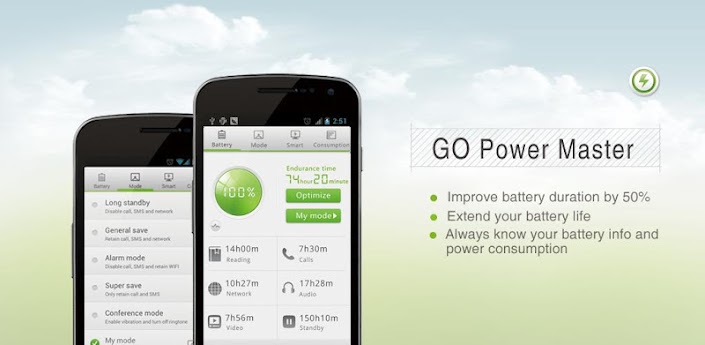
GO Power Master v2.2
Requirements: Android: 2.2 and up
Overview: GO Power Master is a professional tool to help you save the power of the battery

What's new in the version

1.(New) Battery info display including status, temperature, voltage and material. Press the "power curve" button to find it.

2.(Impproved) Power consumption of GO Powe Master

3.(Fixed) Crash issues

4.(Improved) Displaying effect in some devices


[break]

GO Power Master is a professional management tool represented by GO Dev team to help you monitor and save the power of your battery.

Characteristics:

1. Functional module management:

GO Power Master will decrease the power loss by managing the network, the radio, the brightness and other power consumed modules of your mobile phone

2. Running applications monitoring:

GO Power Master will help you to find out the most power consumed applications by precisely monitoring and analyzing the power consuming of every running application.

3. Smart power saving:

GO Power Master will smartly switch to the saving mode when the power is low or the time you set is reached.

4. Time statistics

GO Power Master will precisely calculate the time statistics for endurance, calls, video, audio, network and standby of your battery.

5. One-Touch Optimization helps you to lighten the load of your battery easily.

6. Modes help you to use the battery selectively and wisely.

7. The GO Power Master widgets provide you the way to handle the power quickly without opening the application.

8. More widgets, more functionalities with GO Launcher EX.

How to add the GO Power Master widgets?

-Long press the home screen, select “Widget” and select “GO Power Master (4*1)”. Make sure there’re enough spaces in your home screen.

-If you have already installed GOLauncher EX, you can use the cool GO Power Master GOWidgets with more functions and more effects.

Copyright © 2004-2012 3G.cn All Rights Reserved.

More Info:


Code:

https://play.google.com/store/apps/details?id=com.gau.go.launcherex.gowidget.gopowermaster


Download Instructions:
http://www.filecloud.ws/wt55i7sv19rg

Viper : Free Calls & Messages(2.2.1)

Viper : Free Calls & Messages(2.2.1)


August 24, 2012
by


Viber : Free Calls & Messages

Be Free to Communicate. Call and text anyone, anywhere.Viber lets everyone in the world connect.Freely. More than 90 million Viber users

call, text, and send photos worldwide - for free.Viber is available for Android devices and other smartphones. We are always introducing new features,

platforms and possibilities.Viber is completely free with no advertising and we value your privacy.New in Viber 2.2: you can now send free

messages to groups of friends. Share photos, links and invite more friends to join.


***WHY VIBER?***

* Best Sound Quality

* 100% Free

* Simple to Use

* Always On

* Ad Free

Download Link:
VIPER 2.2.1.apk


: Android Applications


RSS feed for this post (comments)


Previous Post

«
Next Post
»